Kwikpic - Smart Photo Sharing
- 3.7
- Rating
- 1.00M
- Installs
- Free
- Price

 Analysis by App-foxy
I usually judge a photo-sharing app by what happens after the event, when everyone is tired, the camera roll is crowded, and people want their pictures without another long group-chat conversation. Kwikpic - Smart Photo Sharing is built for that moment. It is a free events app from Kwikpic Ai Solutions Private Limited, aimed at making shared photo collection feel more organized than sending images one by one.
That focus gives it a clear purpose. It is not trying to replace a full photo editor, a social network, or a general cloud-storage service. Its appeal is the handoff between taking pictures and getting them to the right people. In my experience, that makes it most interesting for weddings, parties, school functions, trips, and other occasions where many guests capture the same event from different angles.
The app has reached over a million installs and holds a 3.9 average from around 2.8 thousand ratings. Those figures suggest a product with a meaningful user base, but also one that will not suit every phone, event, or sharing habit equally. I would approach it as a focused event tool: useful when a group needs a common place for photos, less convincing when a simple messaging thread already solves the problem.
You May Also Like

 Blood Strike: 2.5 Anniversary
Blood Strike’s Loadouts Turn Every Drop Into a Tactical Gamble
A close look at Blood Strike’s custom loadouts: how fast access to signature weapons reshapes its battle royale rhythm, rewards preparation, and narrows the gap between fights.

 Pandora - Music & Podcasts
Pandora’s Music Is Easy to Start, but Harder to Recover
Pandora’s strength is its low-effort path from a seed to a station. Its weak spot is how much confidence it asks you to place in connection, setup, and quiet recovery.

 8 Ball Pool
 Is Built on Rivalries, Rematches, and Routine
A close look at the rivalries, rematches, shared routines, and unanswered safety questions that turn a quick pool match into a persistent mobile community.

 Samsung Music
’s Quiet Strength Is Playing What You Already Own
Its reach comes less from spectacle than from dependable access to a personal library. That simplicity is both the app’s strongest retention engine and its ceiling.

 AccuWeather: Weather Radar
AccuWeather Review: A Quick, Clear Forecast for Everyday Decisions
For everyday plans, the best forecast is the one you can understand quickly. AccuWeather makes rain timing, radar, and local conditions easy to act on, with a few trade-offs.

 Hill Climb Racing
Why Hill Climb Racing Still Turns Crashes Into One More Run
A tiny car, a bumpy hill and one more upgrade: Hill Climb Racing keeps resurfacing because its simple chaos makes every near-miss feel personal.
More From Our News Desk



How Kwikpic feels when an event gets busy
I find Kwikpic’s event-focused approach most useful when lots of people are taking pictures at once, because a busy occasion can quickly turn a simple collection into a pile of scattered messages. I’d decide in advance who should contribute and what belongs in the shared set, so guests have a clear reason to use the same workflow. That planning also makes it easier to think through which photos are appropriate to share.
Quick sharing is the main promise, not unlimited organization
The first thing I noticed about the concept is how much it depends on timing. A photo-sharing app can feel fast when only a few images are involved, yet become frustrating when guests return from an event with large batches. The practical question is not merely whether a picture can be shared. It is whether people can join the same event workflow without repeatedly asking who has which image.
Kwikpic makes sense when the organizer introduces one place for everyone to contribute. That is a different experience from asking every guest to send their best photos to a single person. The latter creates a bottleneck: one person receives files, sorts them, forwards them, and answers follow-up messages. A shared event approach can reduce that manual work, especially when several guests are photographing at once.
There is an important trade-off, though. A dedicated app only helps if the group actually uses it. For a small gathering where everyone already shares through a familiar messenger, asking guests to install and understand another app may create more friction than it removes. I would explain the purpose before the event and make the joining step part of the invitation, rather than introducing it after the celebration has started.
A realistic wedding workflow
Imagine a wedding where the official photographer has one set of images, while friends and relatives capture candid moments on their phones. I would use Kwikpic as the informal collection point: guests add their pictures during or after the ceremony, and the couple gets access to perspectives they would otherwise miss. This is especially useful for small moments that a hired photographer cannot see everywhere at once.
The best workflow is to establish the event early, tell guests exactly where their photos belong, and encourage them to contribute in manageable batches rather than waiting until their storage is overflowing. I would also keep the original camera files until I had checked that the important images were available. That simple precaution matters with any sharing service, because a transfer or upload should not be treated as the only copy of a meaningful photograph.
For a family member who is not comfortable with new apps, I would assign a helper. One person can gather pictures from less technical guests and add them on their behalf. This is a less obvious but useful way to avoid excluding older relatives or children while keeping the event collection in one place.
What happens during heavy photo sessions
The demanding moments are easy to predict: the end of a ceremony, a group trip returning to a hotel, or a party where several people try to share a large number of images at once. At those times, perceived speed depends on more than the app itself. The phone may be busy processing photos, the connection may be crowded, and the user may be moving between networks.
I would not evaluate the experience from a single small upload. The more realistic test is a mixed batch containing ordinary snapshots, portrait images, and several pictures taken close together. If the app feels responsive during that kind of handoff, it is doing its most important job. If it becomes difficult to tell what has already been submitted, the event workflow can still feel slow even when the network is fine.
My practical advice is to share in stages. After a ceremony, I would send the first useful group rather than waiting to prepare a perfect album. During travel, I would use a stable connection where possible and avoid treating a crowded public network as a reliable test of the app. At home, I would review the event collection and add anything that was missed. This staged approach also makes recovery easier if a phone loses connection halfway through the process.
Stability matters more than flashy extras
For this kind of app, stability means knowing where the event is, recognizing the intended sharing space, and making it easy to continue after an interruption. A photo tool can be attractive, but if users become unsure whether a batch was accepted, they may either duplicate everything or stop contributing. That is why I value clear progress and predictable recovery more than decorative features.
I would keep the app open while beginning a large sharing task and avoid switching between several demanding apps at the same time. If the phone pauses or the connection changes, I would check the event before trying again instead of immediately resending the entire batch. This habit reduces duplicates and protects against the common mistake of assuming that an interrupted action failed completely.
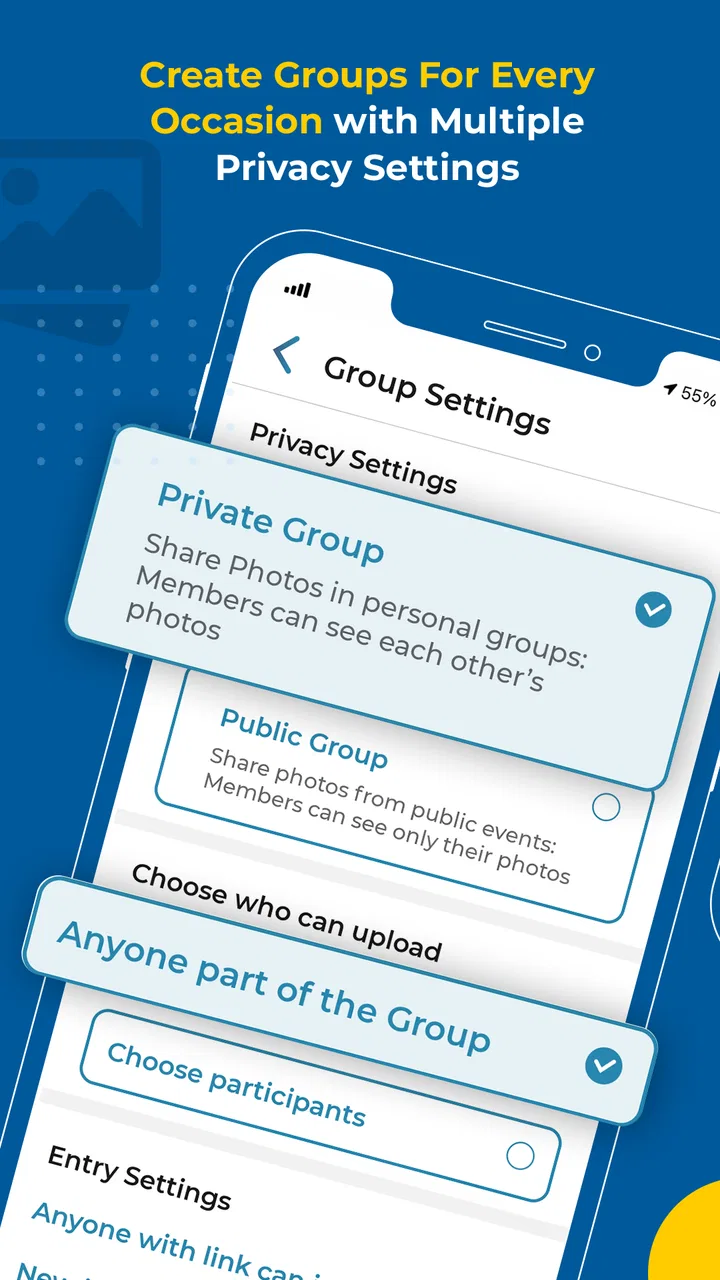
There is also a social side to reliability. The organizer should decide who needs access and explain the event’s purpose clearly. If guests are unsure whether a picture is private, personal, or intended for everyone, they may hesitate to share. A short instruction such as “add candid photos from today, but keep private images out” can improve the quality of the collection more than any technical setting.
Recovery after interruptions
Everyday phone use is messy. A battery can run low, a connection can disappear, or a user can close the app before a task is finished. I would treat recovery as a routine part of using Kwikpic rather than assuming every session will complete perfectly. The safest method is to retain the originals, reopen the event, inspect what is already present, and then continue with only the missing material.
This is particularly important for people who take many similar photographs. Duplicate submissions make an event collection harder to browse and can obscure the best image. A quick review before retrying is worth the extra moment. It also helps the organizer distinguish a genuine missing photo from one that simply appears later because a previous action was still completing.
I would use a similar approach when changing devices. Keep the original images available until the shared collection has been checked from the device that will be used for long-term access. That is not a criticism unique to this app; it is sensible handling for any service that sits between a phone camera and a group archive.
Phone age and resource expectations
Kwikpic supports Android devices beginning with version 5.0, which gives it a broad compatibility range. That does not mean every compatible phone will feel identical. Older hardware may take longer to open large image selections or prepare many files, while newer phones are generally more comfortable with busy camera rolls and repeated sharing sessions.
I would be cautious about judging performance on the basis of the operating-system requirement alone. The real experience also depends on available storage, memory, image size, background activity, and connection quality. If a phone is already close to full, I would clear unnecessary space before a major event. A crowded device can make photo handling feel slow even when the sharing app is functioning normally.
Resource-conscious users should also plan the timing of large tasks. Instead of selecting an entire camera roll immediately after a long day, I would first mark the worthwhile images, then share those. This reduces accidental uploads, shortens the review process, and keeps the event collection more useful. It is a better workflow than expecting the app to solve poor camera-roll organization automatically.
Where it beats familiar alternatives
Compared with sending photos through a group messenger, Kwikpic has a more event-centered idea. A messenger thread mixes photos with jokes, questions, reactions, and unrelated messages. Important images can disappear into the conversation, and people who join later may struggle to find what was shared earlier. A dedicated event space is better suited to a collection that should remain focused.
Compared with asking one organizer to gather everything manually, the distributed approach is more practical. Guests can contribute their own viewpoints instead of forwarding every file to a central person first. That can save time and reduce the chance that one overloaded participant becomes responsible for the entire archive.
Cloud-storage folders still have advantages. They can be preferable when a technically confident organizer wants precise folder control, file management, or a broader document-storage workflow. They may also be easier for a small group that already uses the same storage service. Kwikpic is more appealing when the priority is event participation rather than building a carefully managed file system.
Social networks are another alternative, but they bring a different audience and purpose. Public or semi-public posting is not the same as collecting event memories for a defined group. I would choose Kwikpic when I want the event itself to be the organizing idea, not a public feed or a personal profile.
Who should use it, and who should skip it
I would recommend Kwikpic to people arranging occasions where many cameras capture the same experience. Event hosts, families, travel groups, student organizers, and friends planning celebrations are the clearest audience. It is also useful for someone who is tired of being the only person responsible for collecting everyone’s pictures.
I would be more hesitant for a person who only shares occasional images with one or two close contacts. In that situation, the usual messaging or storage method may be faster simply because everyone already knows it. I would also skip a dedicated event workflow when the group is unwilling to install another app or when the photos are sensitive enough that participants need a sharing arrangement they already understand thoroughly.
The Teen content rating is worth keeping in mind when an event includes younger users. It does not replace adult judgment about what should be photographed or shared. Organizers should set clear boundaries, particularly at school, family, or community events where not every participant may want their image circulated.
Version, ownership, and everyday confidence
The current version is 15.8, and the app was released on July 26, 2022. I see that history as a sign that this is an established product rather than a brand-new experiment. At the same time, an established app still needs to earn trust through the small details: a straightforward event flow, understandable sharing behavior, and a recovery path that does not leave users guessing.
The developer, Kwikpic Ai Solutions Private Limited, has positioned the product around event photo sharing rather than general-purpose image management. That narrow identity is a strength when it matches the occasion. I would not install it expecting a complete replacement for my phone gallery or a professional photographer’s delivery system. I would install it when the central problem is getting many people to contribute to one shared memory pool.
My performance verdict
My overall view is that Kwikpic is most convincing when used deliberately: create the event before people start taking pictures, explain the workflow, share in sensible batches, and keep originals until the collection has been checked. Those habits make the app feel more dependable and reduce the common problems caused by rushed uploads, weak connections, or duplicate submissions.
Its speed should be judged in context rather than through unrealistic expectations. A small collection ought to feel straightforward, while a large event naturally puts more pressure on the phone, network, and participants. The app’s value is not simply how quickly one image moves. It is whether it helps a group avoid scattered messages and gives the organizer a workable way to gather different viewpoints.
The 3.9 average reflects a mixed but substantial user response, and that feels appropriate for a tool whose success depends partly on group behavior. It can remove a real organizational headache, but it cannot force guests to participate or make an old, crowded phone behave like a new one. I would recommend trying it for a planned event where shared collection is genuinely needed, not as a universal answer to every photo-sharing situation.
Because it is free, the barrier to testing it is low. My advice would be to run a small trial with the actual group before the important day: create a practice event, add a few images from different phones, reopen it after leaving the app, and confirm that everyone understands the process. That short rehearsal reveals more than a store summary and gives the organizer time to choose a messenger, cloud folder, or another option if the group prefers a familiar route.
In the right setting, Kwikpic is a practical event collection tool rather than a general photo platform. I like its focused purpose, especially for occasions where dozens of people hold pieces of the same story. I would keep my expectations realistic about heavy batches, older devices, and participation, but for a group willing to follow one shared workflow, it is worth considering.
FAQs for Kwikpic - Smart Photo Sharing
01What is Kwikpic - Smart Photo Sharing used for?
Kwikpic is designed to streamline the process of sharing photos with friends and family. It offers a smart sharing feature that automatically groups photos from events or locations, making it easy to share entire albums with just a few taps. This app is perfect for those who want to efficiently share memories without the hassle of manual sorting.
02How does Kwikpic enhance the photo sharing experience?
Kwikpic enhances photo sharing by using intelligent algorithms to organize photos based on events, dates, and locations. This eliminates the need for users to manually sort and select photos, allowing for quick and hassle-free sharing. Additionally, Kwikpic offers privacy controls to ensure that only selected recipients can view shared albums.
03Is Kwikpic available for both Android and iOS devices?
Yes, Kwikpic is available for download on both Android and iOS platforms. It is designed to provide a seamless experience across devices, ensuring that users can share and receive photos regardless of their smartphone's operating system. You can find the app on both the Google Play Store and the Apple App Store.
04Are there any privacy features in Kwikpic?
Kwikpic includes several privacy features to protect users' photos and personal information. Users can control who sees their shared albums by setting permissions for each album. The app also encrypts photos during transfer, ensuring that sharing is secure and private, giving users peace of mind when sharing personal memories.
05Does Kwikpic offer any editing tools for photos?
While Kwikpic primarily focuses on smart sharing, it also provides basic editing tools to enhance your photos before sharing them. Users can apply filters, crop images, and adjust brightness and contrast within the app. These features allow users to make quick edits, ensuring that shared photos look their best.
Pros
- Easy photo sharing with friends and family.
- Automatic organization of shared albums.
- Intuitive user interface for quick navigation.
- Supports high-resolution image uploads.
- Seamless integration with social media platforms.
Cons
- Limited free storage capacity.
- Requires internet connection for sharing.
- Occasional app crashes reported.
- Photo editing features are basic.
- Notifications can be overwhelming.

Kwikpic - Smart Photo Sharing
Gallery